
Setting up for SMS Notifications
Updated
When you get set up with WealthCharts in the very beginning, your phone number may not be connected to your account! Most members on the platform register their phone numbers so that they can receive SMS notifications for a Price Alert or Scanner Alert.
If you go to create a scanner or price alert, you might notice that the SMS option is disabled or it is asking you to Add a Phone Number. To do this, you will want to go to your Account Settings. Click on the gear icon in the bottom left corner of the platform and then select Account Settings.
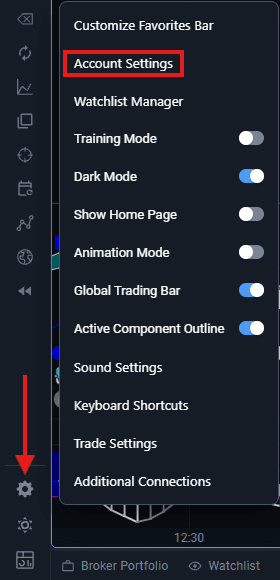
The page you are looking for in the Account Settings menu is the Private Information section. This will show you your First Name, Last Name, Email Address, and the Phone Number associated with the account. If you have not entered your own phone number for the platform, there will be an "Add Phone Number" button for you to select.
When you click the button to add your phone number and type it in, the system will send you a code which you will need to enter to verify the phone number is yours.
After that, your account is all set to receive SMS notifications!