
Changing the design of your orders
Updated
Want to customize how your orders appear on the chart?
When you place trades on your chart, you may see your Position, Limit Orders, Stop Orders, or boxes that say Profit Goal, or Liquidation. You can change the colors of these indications in the Configure Chart menu! Simply right-click your chart, and then select Configure Chart to get started!
The option on the left menu is Trading Themes, and when you select it, you'll see a Style tab and an Advanced Tab. Style shows each of the items except Liquidation. If you click on the Advanced tab, you will see the color change options for the Liquidation indication box and more.
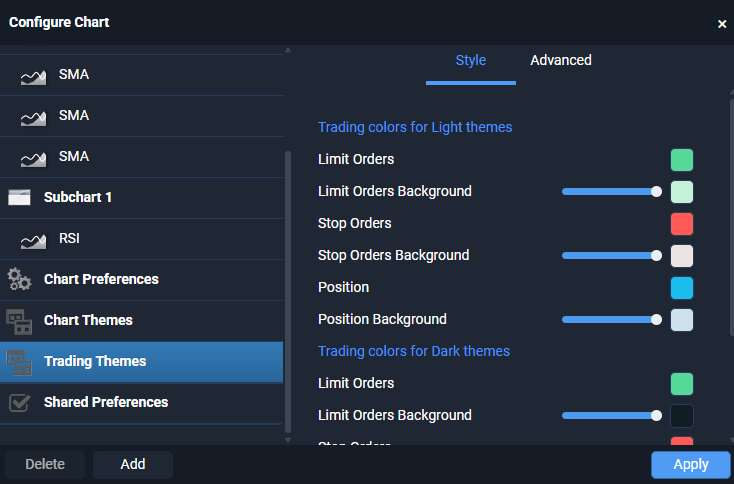
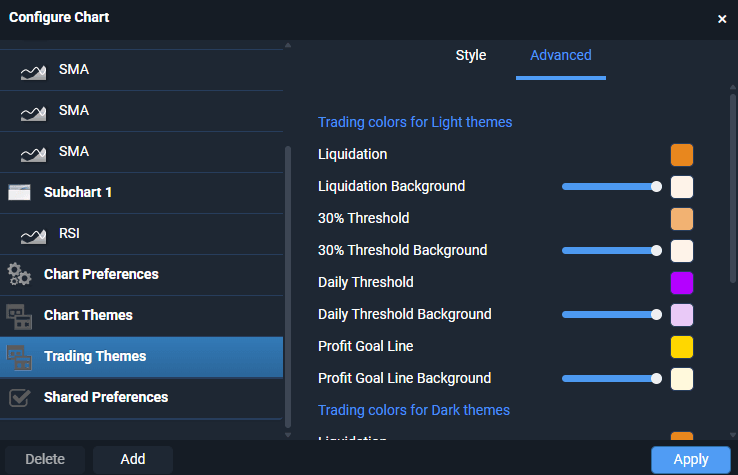
This is a global change and will impact all of your charts. Select Apply when you are finished! You can change these settings at any time.
Was this helpful?
Related guides
Get started with your Prop Trading accountLiquidation Indicator for WealthCharts PropOmniPropTrading DOM
Still stuck? Contact support — phone, chat or email, staffed while the market is open.