Categories
User Set Risk
To begin using the User Set Risk feature on WealthCharts. You will need to use the Broker Portfolio feature. If you already have the Broker Portfolio feature on your platform, disregard steps 1 through 3.
1. Go to the Main Menu located at the top left corner of your platform
2. Go to the Trading Category
3. Locate the Broker Portfolio feature and load it on to your screen.
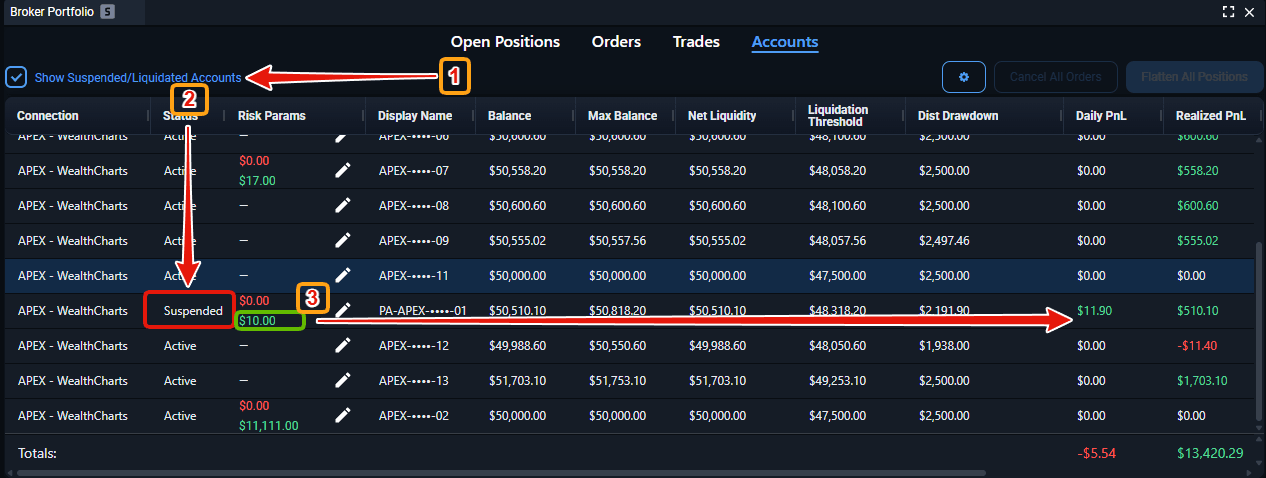
Next, select the Accounts tab located at the top of your Broker Portfolio. You will notice a Risk Params column and a pencil icon in each cell within that column. Clicking on the pencil icon will take you to the menu below:
Click on the "i" icon at the top of the modal to learn more about the User Set Risk functionality.
While an account is in 'Suspended' mode its user risk settings CAN be modified, however, modifying these will NOT restore the account to an active status until the end of the day. This restoration is done automatically and the account will be restored at the beginning of the next trading session.
To see accounts that are suspended or deactivated, click on the check box at the top left corner of your Broker Portfolio.